Savings plans as an alternative to save on sustained usage
Lambda Pricing
Pay per call
Pay per duration
ECS Pricing
EC2 Launch Type Model: No additional fees, you pay for AWS resources stored and created in your application
Fargate Pricing
Fargate Launch Type Model: Pay for vCPU and memory resources allocated to your applications in your containers
S3 Pricing
Storage class: S3 Standard, S3 Infrequent Access, S3 One-Zone IA, S3 Intelligent Tiering, S3 Glacier and S3 Glacier Deep Archive
Number and size of objects: Price can be tiered (based on volume)
Number and type of requests
Data transfer OUT of the S3 region
S3 Transfer Acceleration
Lifecycle transitions
Similar service: EFS (pay per use, has infrequent access & lifecycle rules)
EBS Pricing
Volume type (based on performance)
Storage volume in GB per month provisionned
IOPS:
General Purpose SSD: Included
Provisioned IOPS SSD: Provisionned amount in IOPS
Magnetic: Number of requests
Snapshots:
Added data cost per GB per month
Data transfer:
Outbound data transfer are tiered for volume discounts
Inbound is free
RDS Pricing
Per hour billing
Database characteristics:
Engine
Size
Memory class
Purchase type:
On-demand
Reserved instances (1 or 3 years) with required up-front
Backup Storage:There is no additional charge for backup storage up to 100% of your total database storage for a region.
Additional storage (per GB per month)
Number of input and output requests per month
Deployment type (storage and 1/O are variable):
Single AZ
Multiple AZs
Data transfer:
Outbound data transfer are tiered for volume discounts
Inbound is free
CloudFront Pricing
Pricing is different across different geographic regions
Aggregated for each edge location, then applied to your bill
Data Transfer Out (volume discount)
Number of HTTP/HTTPS requests
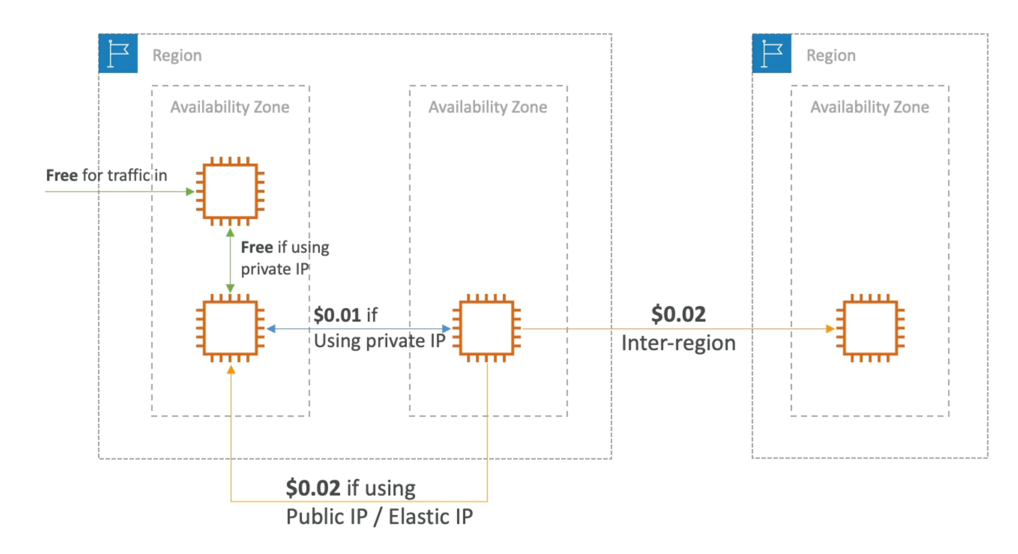
Networking Costs per GB - Simplified
Use Private IP instead of Public IP for good savings and better network performance
Use same AZ for maximum savings (at the cost of high availability)
Billing and Costing Tools
Estimating costs in the cloud:
Pricing Calculator
Tracking costs in the cloud:
Billing Dashboard
Cost Allocation Tags
Cost and Usage Reports
Cost Explorer
Monitoring against costs plans:
Billing Alarms
Budgets
Cost and Usage Reports
Dive deeper into your AWS costs and usage
The AWS Cost & Usage Report contains the most comprehensive set of AWS cost and usage data available, including additional metadata about AWS services, pricing, and reservations (e.g., Amazon EC2 Reserved Instances (RIs)).
The AWS Cost & Usage Report lists AWS usage for each service category used by an account and its IAM users in hourly or daily line items, as well as any tags that you have activated for cost allocation purposes.
Can be integrated with Athena, Redshift or QuickSight
Cost Explorer
Visualize, understand, and manage your AWS costs and usage over time
Create custom reports that analyze cost and usage data.
Analyze your data at a high level: total costs and usage across all accounts
Or Monthly, hourly, resource level granularity
Choose an optimal Savings Plan (to lower prices on your bill)
Forecast usage up to 12 months based on previous usage